Realtime
As mentioned in the Realtime API Overview, Realtime is the component that manages your connection to a room as well as any RealtimeViews that should be connected to the room’s datastore. Use the Realtime component to connect to a room, instantiate realtime prefabs, and query any state about the room.
It's generally a good idea to think of a Realtime instance as a connection to a single room. If you would like to use multiple rooms in your multiplayer project, you can do so by creating additional Realtime instances.
Editor interface
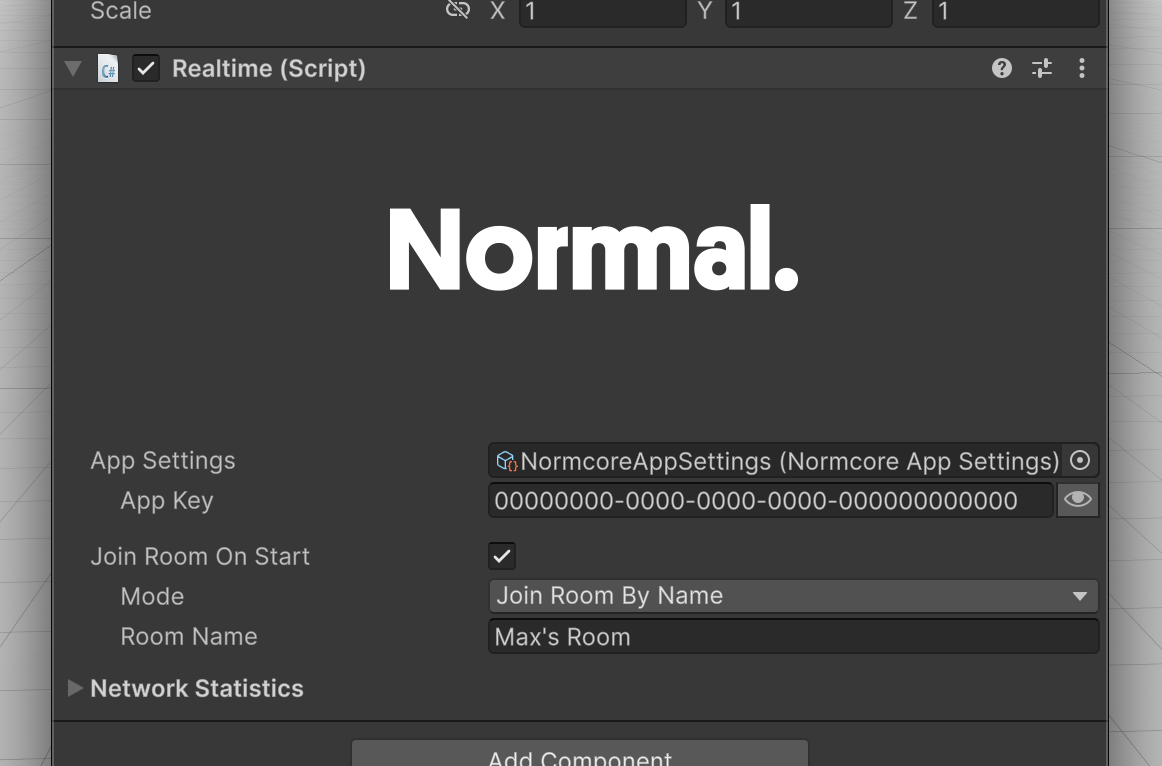
This is what the Realtime component looks like in Unity.
App Settings
This points to a NormcoreAppSettings asset that stores the relevant metadata needed for your application to connect to Normcore servers.
App Key
This is a unique key used to track your app's usage. You can create one over on your account dashboard. This field will update the asset for all instances that use this NormcoreAppSettings asset.
Join Room On Start
If you would like Realtime to automatically connect to a room on Start(), check this box and configure the options below.
Mode
This determines how a room is selected when connecting:
- Join Room By Name: Connect to a specific room by name.
- Next Available Room (Quickmatch): Use Quickmatch to find a room with remaining capacity, or create a new room if all existing rooms are full.
- Offline Room: Connect to an offline room.
Room names are namespaced to your App Key. Any room name used with a different App Key is considered a different room server by Normcore.
Network Statistics
This section displays information about the current running connection:
- Connection: The current connection state (e.g., Connecting, Connected, Disconnected, Error).
- Room Name: The name of the room you are connected to.
- Room Time: The current time on the room server.
- Ping: The round-trip latency to the server in milliseconds.
- Client ID: The client ID assigned for this connection by the room server.
Programming interface
Most of the time that you spend working with Realtime will be via its programming interface. More information is available on using this API in the Realtime API Overview, and individual methods are documented on the Realtime reference page.